Schedule posts from your menu bar
A native Mac app with your queue, a composer and a calendar for X, Bluesky, Mastodon, LinkedIn and Reddit. Free on your Mac, always on with Statuz Cloud.

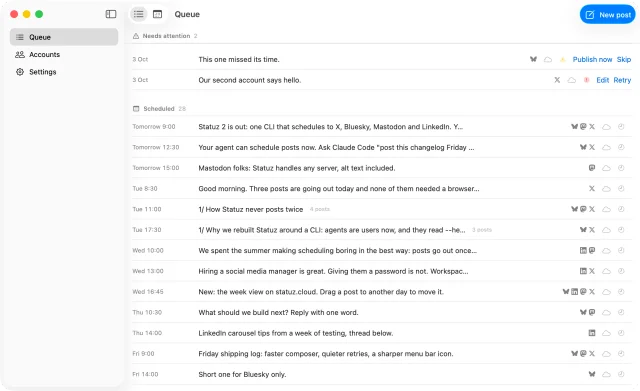
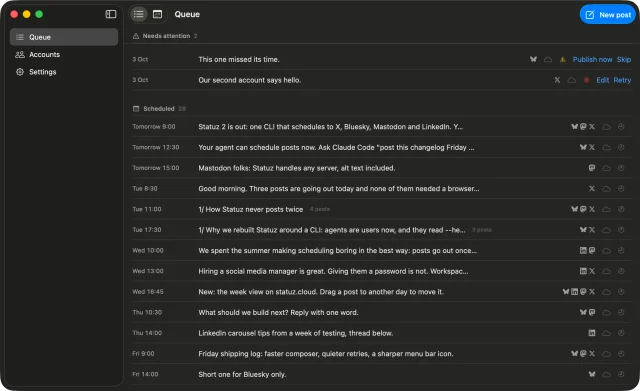


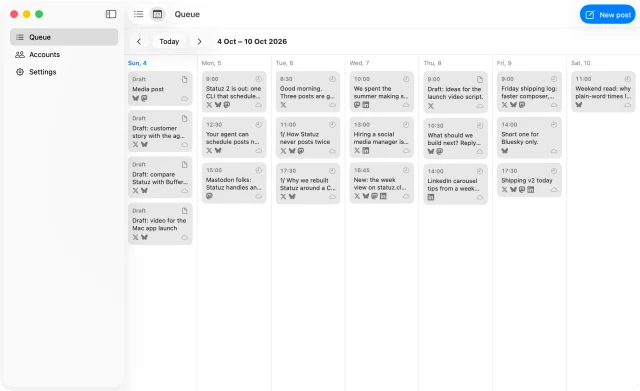
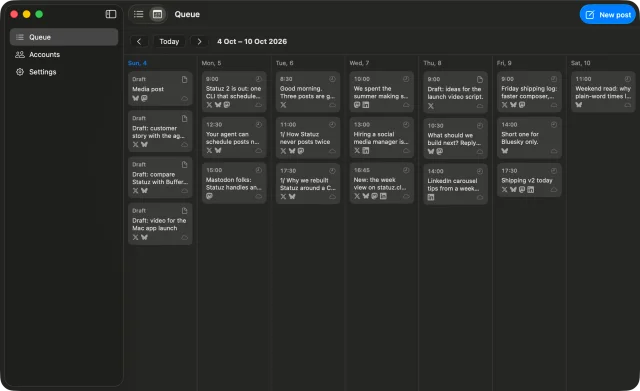
Statuz for Mac
Made for the Mac, like it came with it
SwiftUI, Liquid Glass and the system font. Nothing to learn.

 1
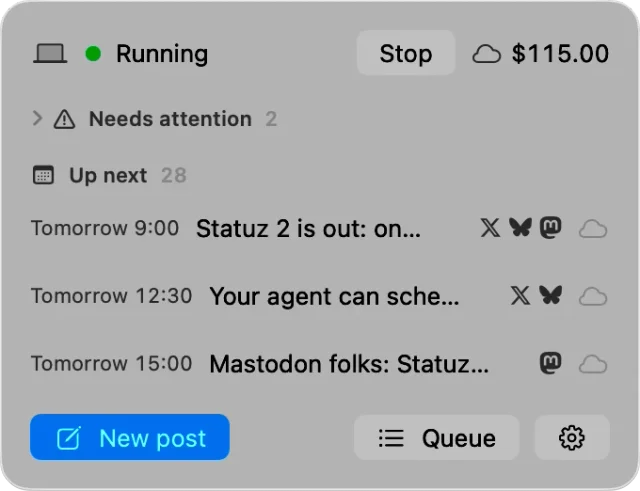
1Your queue in the menu bar
What goes out next and what needs you, one click away. Start or stop publishing from there.
- 2
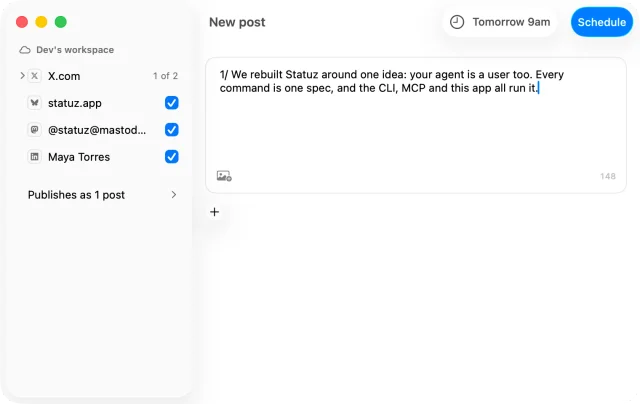
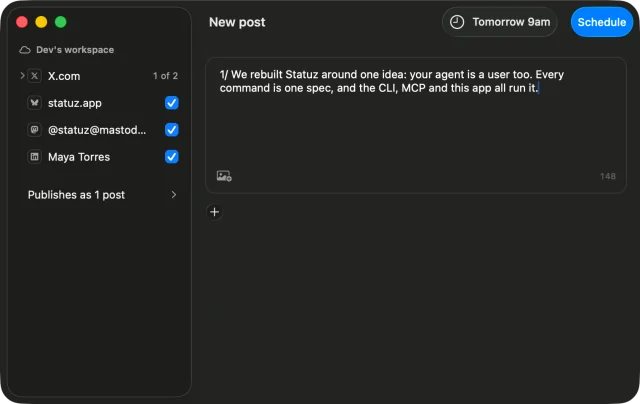
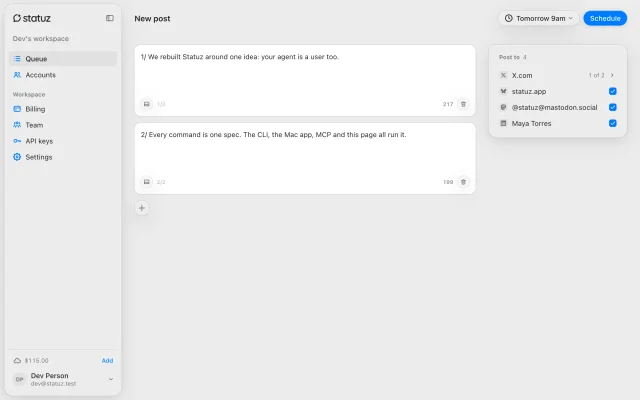
Write once, post everywhere
Threads, media and alt text, with every platform’s limit checked as you type. ⌃⌘C opens it from any app.
- 3
See your whole week
Every scheduled post on a calendar: this Mac’s and your Statuz Cloud workspace’s, side by side.
 4
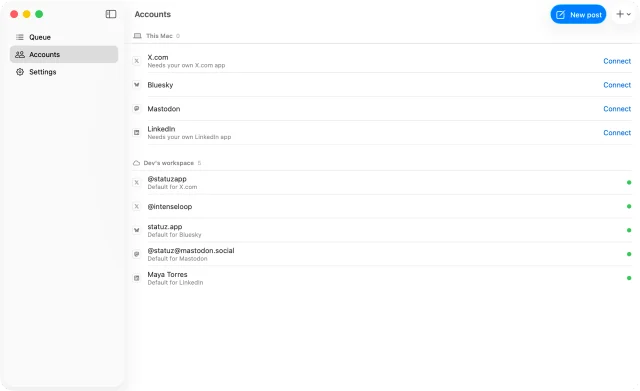
4Every account, one list
Accounts on this Mac and in Statuz Cloud, each with how its sign-in is doing.
Also in the Mac app
macOS 26 or laterSchedule posts from your terminal
A free CLI and MCP server for X, Bluesky, Mastodon, LinkedIn and Reddit. Claude Code, Codex and Cursor drive it, and so can you.
statuz posts create --text "Shipping v2 today" \--title "Statuz v2" --at "fri 17:30"id: p_uqb9pezdt6status: scheduledat: 2026-10-09T20:30:00.000Zdestinations: ACCOUNTID STATUS ATTEMPTS acc_x pending 0 acc_bsky pending 0 acc_masto pending 0 acc_li pending 0 acc_rd pending 0
- Turn the changelog into a thread and schedule it for tomorrow 9am.
statuz · posts_create3 posts · X and Bluesky · tomorrow 9:00 AM- Scheduled: 3 posts, each under every limit. It goes out Monday at 9:00 AM.
- What's going out this week?
statuz · posts_list2 scheduled- Your thread on Monday, then "Shipping v2 today" on Friday at 5:30 PM.
statuz statusdaemon: running: yes service: launchdaccounts: 5scheduled: 2attention: 0next: id: p_yk4rwqgsvp at: 2026-10-05T12:00:00.000Z
How it works
From one line to five platforms
Connect, write, and let the daemon do the rest.
statuz accounts connect --platform blueskyaccount: id: acc_bsky platform: bluesky handle: statuz.app health: okstatuz accounts listID PLATFORM HANDLE REMOTEID DEFAULT HEALTHacc_x x @statuzapp 1 yes okacc_bsky bluesky statuz.app did:plc:statuz yes okacc_masto mastodon @[email protected] 2 yes okacc_li linkedin Statuz urn:li:person:3 yes okacc_rd reddit u/statuzapp statuzapp yes ok
1Connect once
Sign in to each platform in your browser. Tokens go to your keychain, never to a file.
statuz posts create \--text "1/ Why we rebuilt Statuz" \--text "2/ Agents are users now" \--text "3/ So every command is one spec" \--title "Why we rebuilt Statuz" \--at "tomorrow 9am"id: p_yk4rwqgsvpstatus: scheduledthread: 1/ Why we rebuilt Statuz 2/ Agents are users now 3/ So every command is one specat: 2026-10-05T12:00:00.000Z
2Write it your way
A post or a thread of up to 25, now or "tomorrow 9am" in your time zone.
statuz posts create --text "$(cat launch.md)" --to xerror: X.com (@statuzapp): 352 characters, the limit is 280 thread.0.text: X.com (@statuzapp): 352 characters, the limit is 280statuz posts create --text "Statuz 2 ships" --to x --at "fri 9am"status: scheduled
3Checked before it’s saved
Every post meets every platform’s limits up front, so nothing fails at 9am for being too long.
statuz startdaemon: running: yes service: launchdstatuz statusaccounts: 5scheduled: 2attention: 0next: at: 2026-10-05T12:00:00.000Z
4Out on time, once
The daemon publishes while your computer is on and retries what a platform drops. A copy that went out never goes again.
For agents
Your agent posts for you
Every command is a tool your agent already knows how to use: schedule, check, retry, move.
Agent setup- Anything that needs me?
statuz · status1 failed: LinkedIn timed out- The LinkedIn copy of "Shipping v2 today" timed out. X, Bluesky and Mastodon went out. Retry LinkedIn?
- Yes, and move tomorrow’s posts to 10am.
statuz · posts_publish, posts_editLinkedIn published · 3 posts moved- Done. LinkedIn is out, and tomorrow starts at 10:00 AM.
- Schedule this thread for Friday 9am
- What's going out this week?
- Retry the LinkedIn post that failed
- Move tomorrow's posts to 10am
Yours
Your keys never leave your computer
Statuz runs on your Mac or Linux computer. No account, nobody in the middle.
- You or your agentThe CLI, MCP or the Mac appruns statuz
- This computerThe daemon and your keychainYour own sign-in
- The platformsX, Bluesky, Mastodon, LinkedIn, Reddit
Our serversNever in the middle
Never posts twice
Failures retry after 1, 5 and 15 minutes. A half-sent thread picks up where it stopped.
Late posts wait
Computer asleep past the time? The post waits for you instead of going out hours late.
Keys in your keychain
Tokens live in the OS keychain. Nothing in plain files, nothing on our side.
Free, no account
No sign-up, no watermark, no post limit on your own computer.
Try it
statuz posts create \
  --text 'Shipping Statuz v2 today: one CLI for X, Bluesky, Mastodon, LinkedIn and Reddit. statuz.app' \
--at 'tomorrow 9am'Install
Install Statuz
brew install intenseloop/tap/statuzmacOS and Linux. Updates with brew upgrade.
statuz initsets up ~/.statuz; pick which agent apps use itstatuz accounts connect --platform blueskyapprove in the browserstatuz startpublishes scheduled posts
npm i -g statuz-cliInstalls the binary for your OS and CPU.
statuz initsets up ~/.statuz; pick which agent apps use itstatuz accounts connect --platform blueskyapprove in the browserstatuz startpublishes scheduled posts
bun add -g statuz-cliThe same package as npm.
statuz initsets up ~/.statuz; pick which agent apps use itstatuz accounts connect --platform blueskyapprove in the browserstatuz startpublishes scheduled posts
curl -fsSL https://statuz.app/install | shChecks the download, installs to ~/.local/bin.
Read the install script
#!/bin/sh
# Statuz installer: curl -fsSL https://statuz.app/install | sh
#
# Downloads the statuz binary for this OS and CPU from cdn.statuz.app,
# checks its SHA-256 against the release's SHA256SUMS, and puts it in
# ${STATUZ_INSTALL_DIR:-$HOME/.local/bin}. Needs curl, tar and shasum or sha256sum.
set -eu

# statuz.app fills in the latest release when it serves this script.
version="${STATUZ_VERSION:-2.2.5}"
downloads="${STATUZ_DOWNLOAD_URL:-https://cdn.statuz.app/download/cli}"
install_dir="${STATUZ_INSTALL_DIR:-$HOME/.local/bin}"

fail() {
	printf 'statuz install: %s\n' "$1" >&2
	exit 1
}

need() {
	command -v "$1" >/dev/null 2>&1 || fail "$1 is required"
}

need curl
need tar

case "$(uname -s)" in
Darwin) os=darwin ;;
Linux) os=linux ;;
*) fail "unsupported OS $(uname -s): Statuz runs on macOS and Linux" ;;
esac

case "$(uname -m)" in
arm64 | aarch64) arch=arm64 ;;
x86_64 | amd64) arch=x64 ;;
*) fail "unsupported CPU $(uname -m): Statuz needs arm64 or x64" ;;
esac

# An x64 shell under Rosetta on Apple silicon: install the native build.
if [ "$os" = darwin ] && [ "$arch" = x64 ] &&
	[ "$(sysctl -n sysctl.proc_translated 2>/dev/null || echo 0)" = 1 ]; then
	arch=arm64
fi

if command -v shasum >/dev/null 2>&1; then
	sha256() { shasum -a 256 "$1" | cut -d ' ' -f 1; }
elif command -v sha256sum >/dev/null 2>&1; then
	sha256() { sha256sum "$1" | cut -d ' ' -f 1; }
else
	fail "shasum or sha256sum is required"
fi

[ -n "$version" ] ||
	fail "no version: run it as curl -fsSL https://statuz.app/install | sh, or set STATUZ_VERSION"

file="statuz-cli-$os-$arch-$version.tgz"
release="$downloads/$version"

work="$(mktemp -d)"
trap 'rm -rf "$work"' EXIT INT TERM

sums="$(curl -fsSL "$release/SHA256SUMS")" ||
	fail "could not reach $release/SHA256SUMS"
checksum="$(printf '%s\n' "$sums" | sed -n "s/^\([0-9a-f]\{64\}\)  $file\$/\1/p" | head -n 1)"
[ -n "$checksum" ] || fail "statuz $version has no build for $os-$arch"

printf 'Downloading statuz %s for %s-%s\n' "$version" "$os" "$arch"
curl -fsSL "$release/$file" -o "$work/statuz.tgz" || fail "download failed: $release/$file"

actual="$(sha256 "$work/statuz.tgz")"
[ "$actual" = "$checksum" ] ||
	fail "checksum mismatch (expected $checksum, got $actual); nothing was installed"

tar -xzf "$work/statuz.tgz" -C "$work" package/bin/statuz ||
	fail "the package has no bin/statuz"

mkdir -p "$install_dir"
mv "$work/package/bin/statuz" "$install_dir/statuz"
chmod +x "$install_dir/statuz"

printf '\nInstalled statuz %s to %s/statuz\n' "$version" "$install_dir"

case ":$PATH:" in
*":$install_dir:"*) ;;
*)
	printf '\n%s is not on your PATH. Add this to your shell profile:\n' "$install_dir"
	printf '  export PATH="%s:$PATH"\n' "$install_dir"
	;;
esac

printf '\nNext:\n'
printf '  statuz init                 set up ~/.statuz and the agent guide\n'
printf '  statuz accounts connect     connect X, Bluesky, Mastodon or LinkedIn\n'
printf '\nDocs: https://statuz.app/docs\n'
statuz initsets up ~/.statuz; pick which agent apps use itstatuz accounts connect --platform blueskyapprove in the browserstatuz startpublishes scheduled posts
Connect your agent
Choose your agent
Agents with a terminal run statuz, like you do. Chat apps connect to Statuz Cloud.
statuz init- Tick Claude Code in the list it shows; the Statuz skill goes in ~/.claude/skills.
- Ask: "Schedule a post to Bluesky for tomorrow 9am." Claude Code runs statuz for you.
statuz init- Tick Cursor in the list it shows; the Statuz skill goes in ~/.cursor/skills.
- The agent runs statuz in its terminal and asks before each command.
statuz init- Tick Codex in the list it shows; the Statuz skill goes in ~/.agents/skills.
- Ask: "What is scheduled this week?" Codex runs statuz and shows each result.
https://api.statuz.cloud/mcp- In Claude, on the web, desktop or phone: Settings → Connectors → Add custom connector. Paste it.
- Click Connect and sign in to statuz.cloud. On Team and Enterprise, an owner adds it first.
statuz agents add --agent claude-desktophttps://api.statuz.cloud/mcp- In ChatGPT’s settings, turn on developer mode under Apps & Connectors.
- Create a connector with this address and OAuth, then sign in to statuz.cloud.
statuz init- Tick VS Code in the list it shows; the Statuz skill goes in ~/.copilot/skills.
- Copilot in agent mode runs statuz in the terminal after you approve.
statuz init- Tick Windsurf in the list it shows; the Statuz skill goes in ~/.codeium/windsurf/skills.
- Cascade runs statuz in its terminal.
statuz init- Tick Gemini CLI in the list it shows; the Statuz skill goes in ~/.gemini/skills.
- Gemini CLI asks before it runs each statuz command.
statuz init- Tick Copilot CLI in the list it shows; the Statuz skill goes in ~/.copilot/skills.
- Copilot CLI asks before it runs each statuz command.
statuz init- Tick OpenCode in the list it shows; the Statuz skill goes in ~/.config/opencode/skills.
- OpenCode runs statuz in its shell.
statuz agents add --agent lm-studio- It adds Statuz to ~/.lmstudio/mcp.json, on this Mac; your other servers stay.
- LM Studio loads it on save. Chat with a model that can call tools.
https://api.statuz.cloud/mcp- Any app that takes an MCP server address: sign in to statuz.cloud when it asks.
- Or send an API key as a Bearer header (statuz.cloud → API keys).
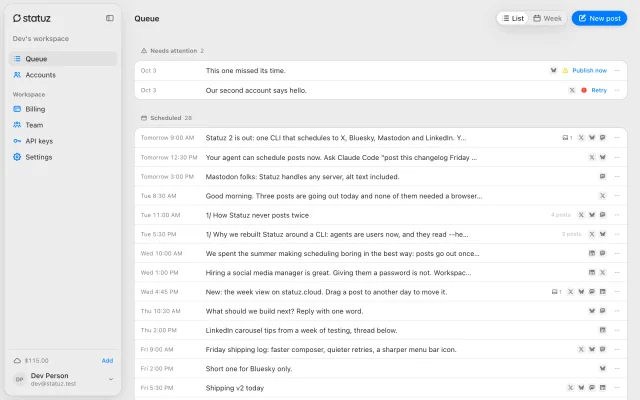
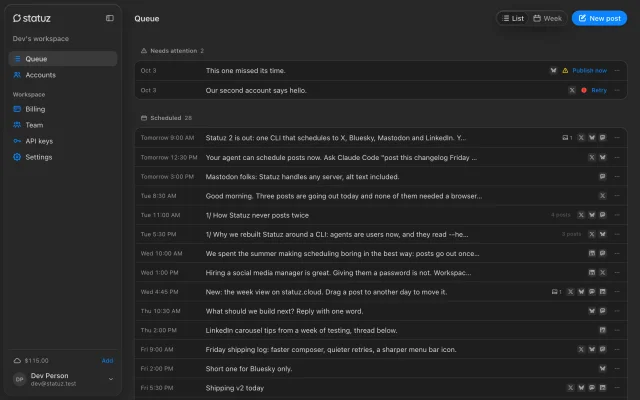
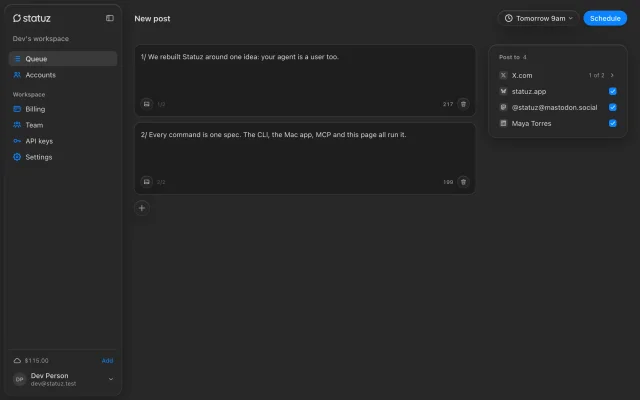
statuz help --jsonA social media scheduler that never sleeps
Statuz Cloud posts to X, Bluesky, Mastodon, LinkedIn and Reddit from our servers, for you, your team and your AI agent. From $0.01 a post, no subscription.
- X.com
- Bluesky
- Mastodon
- RedditBeta



How it works
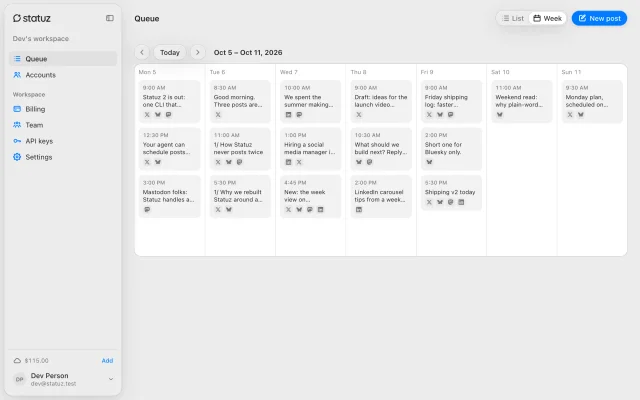
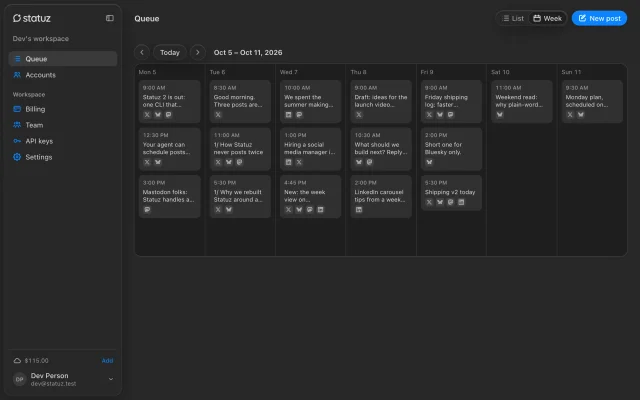
Write it once. We post it on time.
Your computer can be off. Statuz Cloud is always on.


 1
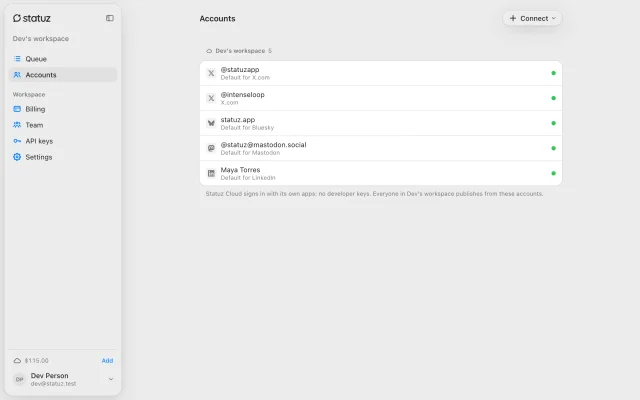
1Connect in a click
Sign in to each platform once. Statuz Cloud brings its own X and LinkedIn apps: no developer keys.
- 2
Write in the browser
Threads, media and alt text, checked against every platform as you type. Or from the Mac app, the CLI or your agent.
- 3
Plan the week
Every post on a calendar. Your computer can be closed: we publish at the time you picked.
 4
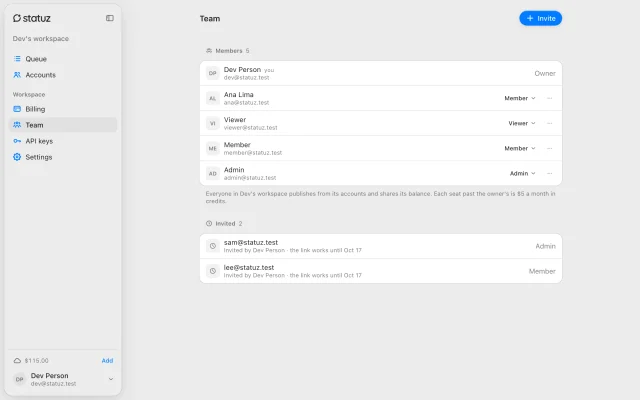
4Bring the team
Viewers look, members write, admins run keys and accounts. Nobody hands out a password.
For AI agents
Your agent posts for the team
Claude and ChatGPT connect as you, and Claude Code and Cursor through the CLI. Scripts and CI use API keys, and a read-only key can't publish.
Agent setup- Schedule the launch thread for Monday 9am, team account.
statuz · posts_create3 posts · the workspace's 4 accounts · Mon 9:00 AM- Scheduled on Statuz Cloud. It goes out Monday at 9:00 AM, even with your laptop closed.
- Sign in as you
- MCP at api.statuz.cloud/mcp
- Read-only API keys
- Same queue as the team
CLI
Or from your terminal
One command signs the CLI in. Every command then runs against your workspace.
npx statuz-cli loginOpen this link to sign in: https://api.statuz.cloud/oauth/authorize?…Signed in to Statuz Cloud (https://api.statuz.cloud).statuz use cloudstatuz posts create --text "Launch day" --at "mon 9am"id: p_k2v8tqwm4dstatus: scheduled
For teams
Shared accounts, never shared passwords
Everyone posts from the workspace's accounts. Sign-ins stay encrypted on our servers, out of everyone's hands.
- Your team and agentsWeb, Mac app, CLI or MCPby role
- Statuz CloudAlways on, encrypted sign-insAt the time you picked
- The platformsX, Bluesky, Mastodon, LinkedIn, Reddit
Your passwordsNobody on the team ever sees one
Roles
Viewers look. Members write and change their own posts. Admins run the team; the owner pays.
Never posts twice
Failures retry. A half-sent thread picks up where it stopped.
Your logo all the way
Turn on the watermark and Statuz adds it to images and videos as they go out.
One balance
The workspace pays per post; each seat past the owner's is $5 a month.
Pricing
All prices| Bluesky, Mastodon, LinkedIn, Reddit Beta | $0.01 a post |
| X.com | $0.03 a post |
| X.com with a link | $0.30 a post |
| X.com direct message | $0.015 each |
| X.com search | $0.005 a post it finds |
| X.com reply lookup | $0.005 a post it reads |
| Each seat past the owner's | $5 a month, prorated the month they join |
Prepaid credits from $5. Drafts, scheduling, edits and agent calls are free.
Connect your agent
Agent setupnpx statuz-cli loginhttps://api.statuz.cloud/mcpStatuz Cloud questions
Do I need X or LinkedIn developer apps?
No. Statuz Cloud signs in with its own X and LinkedIn apps. You click Connect and approve.
Is there a subscription?
No. You add prepaid credits, from $5, and each published post spends a little. Drafts, scheduling and edits are free.
What happens when credits run out?
Scheduled posts wait instead of failing. Add credits and they go out in order. Auto-reload can top up the balance from a saved card.
Do credits expire?
Yes, 6 months after you add them. The oldest credits are spent first, and Statuz warns you 14 days before.
Can my AI agent post?
Yes. Claude, Codex, Cursor and others connect over MCP or run the statuz CLI. Scripts and CI use API keys with their own role (viewer, member or admin), so an agent gets only the reach you choose, never billing.
Can I run Statuz without the cloud?
Yes. The CLI and the Mac app are free on your own computer. Statuz Cloud is for posts that must go out while it sleeps, and for teams.
Your computer or Statuz Cloud
CompareSide by side9
| Feature | Your computer | Statuz Cloud |
|---|---|---|
| Price | Free | From $0.01 a post, prepaid |
| Account | None | Sign in with Google or email |
| Publishes while you sleep | When the computer is awake | Always |
| X and LinkedIn apps | Your own developer apps | Statuz's, nothing to set up |
| Sign-in tokens | Your OS keychain | Encrypted on our servers |
| Bluesky sign-in | Reconnect every 2 weeks | Stays signed in |
| Teams | — | Orgs and roles, $5 a month per extra seat |
| Watermark | None | Your logo, per post |
| Clients | CLI, MCP, Mac app | CLI, MCP, Mac app, web |
Questions
Is Statuz free?
Yes. The CLI and the Mac app are free, with no watermark. Statuz Cloud is optional and paid per post.
Do I need an account?
Not to run it on your own computer. You only sign in for Statuz Cloud.
Which platforms does it post to?
X, Bluesky, Mastodon and LinkedIn: posts, threads, images and video. Reddit too, in beta.
Can ChatGPT, Claude or Cursor use it?
Yes. Agents with a terminal, like Claude Code and Cursor, run the CLI. Chat apps like Claude and ChatGPT connect to Statuz Cloud as a connector.
Where are my sign-in tokens?
Locally, in your OS keychain. With Statuz Cloud, on our servers, so Cloud can publish for you.
What does Statuz Cloud cost?
$0.01 per post on Bluesky, Mastodon, LinkedIn and Reddit (beta), $0.03 on X. Prepaid credits from $5.
From the blog
All postsYour queue, one click away
Free on your Mac. Add Statuz Cloud when posts can’t wait for it.
- X.com
- Bluesky
- Mastodon
- RedditBeta